
TabGod Install free

Free for Firefox · Chrome · Edge

Keep your tabs organized.
Find your way back.

TabGod groups related tabs automatically. Step back through the tabs you visited, or search for any open or archived tab.

For desktop browsers. No account or telemetry.

Add it from your browser’s store

Firefox Chrome Edge Safari (not available yet)

Safari is not available yet. Store reviews can delay new versions.

TabGod popup with named topic groups
Real groups in the TabGod popup.

Auto-grouping

Groups you can recognize.

Related pages from the same site belong together, with a name you recognize. On-device topic grouping helps organize the rest.

Names you choose and tabs you place yourself stay under your control. Automatic collapsing keeps your active group visible, respects groups you expand, and leaves Recent open. You can pause the automation in Options.

named on deviceundo in one clickone switch to pause it

Tab history

Back to the tab you were just using.

Step back and forward through the tabs you actually worked in, without opening the palette. Tabs you only passed through stay out of the way.

Step back
Alt + Shift +
Step forward
Alt + Shift +
Toggle between two tabs
Alt + Shift +

Default shortcuts. On Mac, use Option in place of Alt. See your current bindings and how to change them in Options → Tab history.

Try a sample tab history

Three tabs, in the order you visited them.

  1. Project notes
  2. Issue discussion
  3. API documentation

API documentation. Tab 3 of 3.

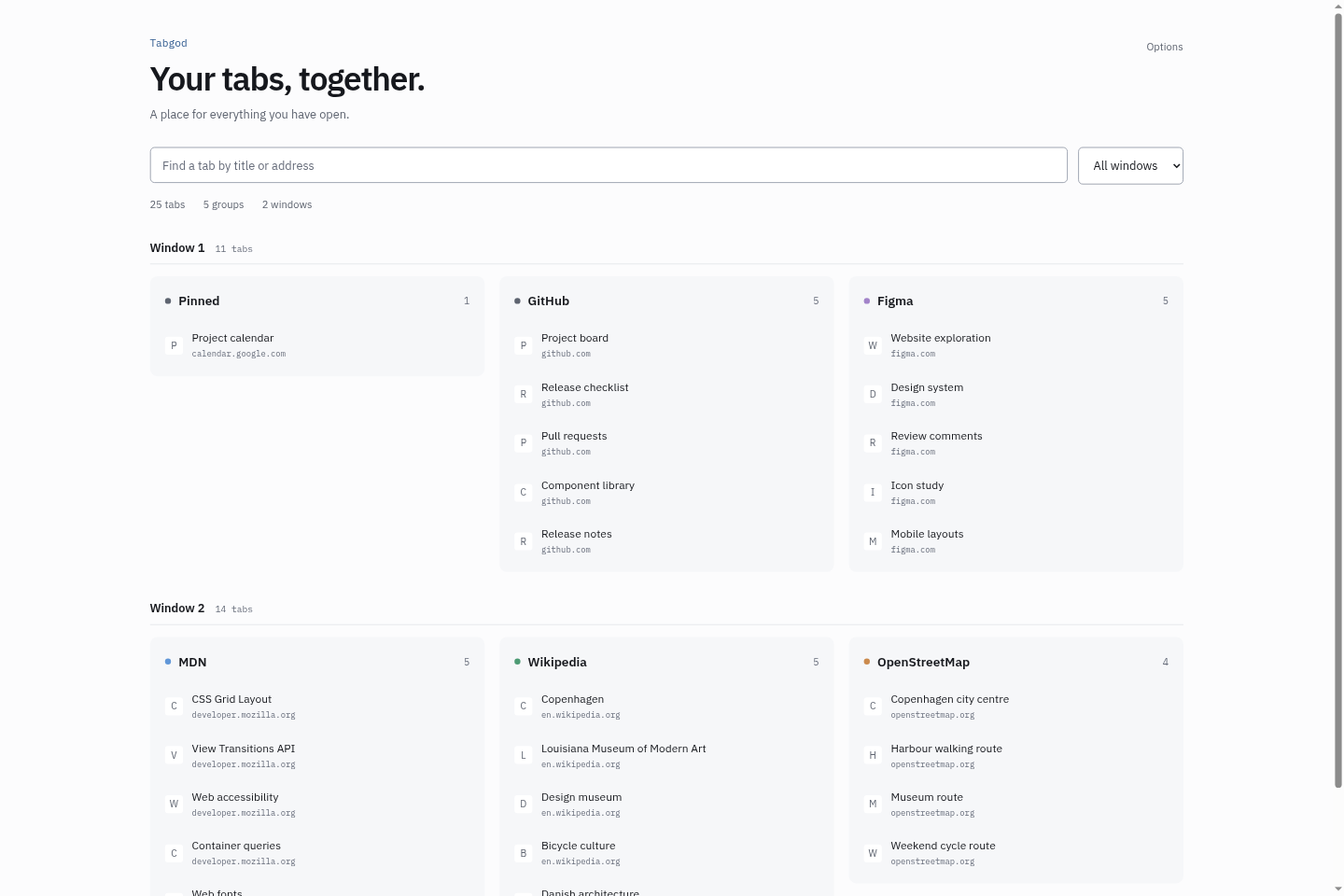
TabGod Overview showing sample tabs across two windows, with Pinned, GitHub, Figma and other named groups

Overview

A home for every open tab.

The overview brings all your windows into one searchable page. Jump straight to a tab, see its group, or close what you no longer need.

It’s pinned by default, so it’s always easy to reach. Prefer your own setup? Turn it off in Options.

Free & paid

A useful free edition.
A few extra power tools.

No subscription. A perpetual licence for v1, with no device limit. Refund terms.

Free

$0 forever

  • Automatic domain and topic grouping, with a Recent working set
  • Direct back, forward and two-tab toggle shortcuts
  • Cross-window search, local archive, import and export
  • Pinned overview, palette pin/unpin, duplicates, bookmarks and timeline
  • Safe auto-suspend and optional browser-native sync
Install free

Power tools

$25 once

  • Concept search: type ? and what you remember, even when the words aren’t in the title
  • Cross-window aggregation of semantic groups, sticky names and richer activity signals
  • Restore a closed window with its groups preserved
  • Web search from the palette, custom tab-assignment rules and idle auto-archive
  • Offline licence validation and a separate switch for every paid feature

Privacy

Your browsing isn’t our business.

TabGod never receives your tab URLs, titles, page content or activity signals. The grouping model runs on your device, and the extension ships no telemetry SDK.

If you enable browser-native sync, your browser’s service handles that data under its own privacy terms. Buying a licence uses a separate payment and licensing service.

Read the privacy policy

Questions

Can I turn off the pinned overview?

Yes. Open Options and turn off “Keep Tabgod Overview pinned”. You can still open the overview when you need it.

Which browsers can I use?

Install from the stores linked above. The Chrome extension also works in Chromium browsers such as Brave, Opera and Vivaldi. The Safari build is free-only; its availability is shown with the store links.

Does the licence expire?

No. A v1 licence is perpetual and validates offline. It is not a subscription and has no device limit. Paid features work in Firefox and Chromium browsers.

How do refunds work?

Refunds are handled by Stripe under the published refund policy. See the full refund terms for the 14 days promise and your statutory rights.